Explore platforms to get started
Meta Quest supports a range of development platforms so you can build with the tools and languages you already know. Whether you're working in a game engine, building a native Android app, or shipping a web experience, there's a path for you.
Build for Meta Horizon OS
Choose the development path that fits your skills and what you're building. Each platform has full documentation, samples, and guides to get you from setup to submission.Unity

Build immersive games and experiences with the most-used engine on Quest
Full access to every Quest capability
Hand tracking, passthrough, spatial audio, scene understanding, Interaction SDK, Movement SDK, and more — all available as ready-made SDKs with prefabs and samples you can drop into your project.
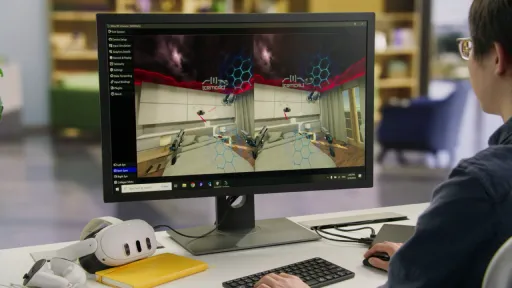
Extensive documentation and samples
Start with curated tutorials, sample projects with full walkthroughs, and step-by-step guides on the Meta Developer Center. If you're new to Unity, Unity Learn offers free courses for all skill levels.
Large developer community
Unity has the largest XR developer community. Get help from peers, find tips and solutions, and access years of shared knowledge building immersive apps.
Cross-platform deployment
Build once and deploy across Quest headsets, mobile, and desktop. Unity's multi-platform support lets you reach new audiences without rebuilding from scratch.
Unreal Engine
Create high-fidelity experiences with Unreal Engine's rendering power
Optimized for Quest out of the box
The Meta fork includes Quest-specific rendering optimizations, passthrough support, hand tracking, and scene understanding. Use Blueprints for rapid prototyping or C++ for full control over performance.
Visual scripting with Blueprints
Prototype and ship gameplay logic without writing C++. Blueprints let designers and developers iterate quickly while maintaining the option to drop into code when needed.
Industry-proven for high-end VR
Unreal Engine powers some of the most visually impressive Quest titles. Its rendering pipeline, material system, and lighting tools are built for the fidelity that immersive experiences demand.
Port existing Unreal projects
Already have an Unreal project? Bring it to Quest by adding the Meta XR plugin, optimizing for mobile GPU, and deploying directly to the headset. Documentation walks you through the porting process step by step.
Native and OpenXR
Maximum control with C/C++ and the OpenXR standard
Full OpenXR spec with Meta extensions
Access hand tracking, passthrough, scene understanding, spatial anchors, and more through OpenXR extensions. Build portable XR apps that target multiple headsets while still accessing Quest-specific features.
Custom engine support
Running your own engine or middleware? Native development gives you direct access to the OpenXR runtime without an intermediary layer. Integrate XR support into any C/C++ codebase.
Performance without abstraction
Control memory allocation, rendering submission, and threading directly. No engine overhead — just your code talking to the hardware through a standardized API.
Cross-headset portability
OpenXR is the industry standard. Code you write against the core spec runs on Quest, PC VR headsets, and other conformant runtimes with minimal porting effort.
Meta Spatial SDK

Build spatial apps with familiar Android tools
Meta Spatial SDK brings spatial capabilities to Android development. Use Kotlin, Android Studio, and the mobile skills you already have to build apps with 3D panels, spatial anchors, and environment blending.
Android development with spatial superpowers
Write Kotlin, use Jetpack Compose for 2D UI, and add spatial features through accessible APIs. Quest becomes another form factor in your mobile development workflow — not a completely new technology stack.
Ship faster with familiar tools
Build on top of your existing Android apps and distribute them to Quest. Reduce development time by leveraging the Android ecosystem — Gradle, Android Studio, and the libraries you already use.
Rich spatial capabilities built in
Combine 2D UI with 3D content, spatial audio, physics, controllers, hand input, and keyboard support. These capabilities are built into the SDK core so you don't need to integrate them separately.
Stand out with spatial experiences
Go beyond flat screens. Place app content in the user's physical space, use multiple panels, and create experiences that take advantage of room-scale interaction and environmental awareness.
Android apps
Bring your existing Android app to Quest with minimal changes
Minimal code changes required
Most Android apps work on Quest out of the box. Remove Google Mobile Services dependencies, test input mapping, and optimize for the headset display. Your existing architecture, UI, and business logic stay the same.
Automatic input mapping
Mobile gestures (tap, swipe, scroll, pinch) automatically work with Quest controllers and hand tracking. Users interact with your app the same way they would on a phone — no XR input code needed.
Add spatial features incrementally
Start with your app as a 2D panel, then progressively add spatial features using Meta Spatial SDK — multiple panels, 3D content, spatial anchors, and environment blending — at your own pace.
Reach a new audience
Publish to the Meta Horizon Store alongside your existing Play Store and App Store listings. One codebase, multiple storefronts, growing user base.
Web and PWAs
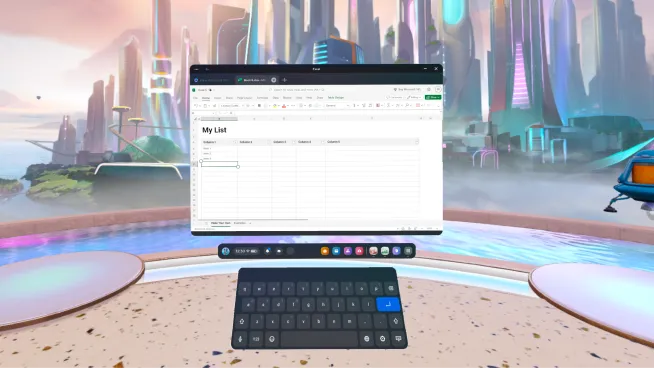
Ship your web app to Quest — or go immersive with WebXR
Your web app already works in the Quest browser. Package it as a PWA for the Horizon Store, or add immersive VR and MR with WebXR using Three.js, A-Frame, or Babylon.js. No engine or native code required.
Lowest barrier to entry
Use JavaScript/TypeScript and the web frameworks you already know. Test in a desktop browser, then deploy to Quest. PWAs install from the Horizon Store and run as standalone panels.
Progressive Web Apps
Package your web app and publish it to the Horizon Store. PWAs run as 2D panels with full access to web APIs, offline support, and push notifications. One codebase serves mobile, desktop, and Quest.
WebXR for immersive experiences
Add immersive VR and MR to your web app with the WebXR Device API. Access hand tracking, spatial anchors, and passthrough through standard web APIs. Build with Three.js, A-Frame, Babylon.js, or any WebGL framework.
Cross-platform by default
Web apps and WebXR experiences run on Quest, PC VR headsets, and mobile browsers. Build once and reach users across every device with a URL — no app store submission required for web-only distribution.
Games and apps created for Meta Horizon OS
Among Us

Creed

Xtadium

Support and legal
Support and legal
Support and legal
English (US)
© 2026 Meta